If you’re curious about becoming a broadcaster or you’re ready to take the plunge, this is for you. I’m going to walk you through creating a Chaturbate broadcaster account.
I’ll also explain how to get Chaturbate age verified so you can start broadcasting and earning quickly.
Let’s get straight into it!
Step 1: Create Your Account
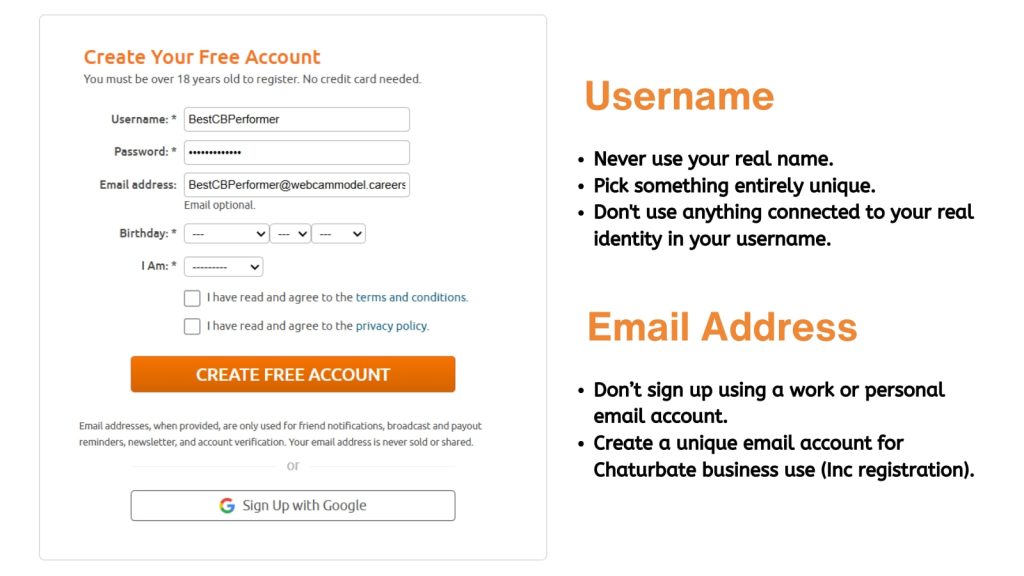
Creating an account on Chaturbate is super easy. To start, you need to come up with a unique username and stage name or nickname. If you have read any of my other posts, you’ll know that I am known as Jess, this is not my real first name.
Choosing the right username is important for privacy and building your broadcaster identity. Here are some tips I recommend to help you pick your perfect name.
Tips for Choosing a Username
Never use your real name or any part of it in your Chaturbate username. I’m not saying I know anybody who has ever done this, but I’m just telling you, don’t do that. Pick something entirely unique. Bonus points if it fits with your future camming name or online persona.
Also, don’t use anything connected to your real identity in your username. I’m Jessica Wett online, but fans in my chat just call me Jess. That’s my stage name that fans see in my bio and address me by.
It’s also recommended to have a separate e-mail just for your Chaturbate business use (including registration). Never sign up using a personal or work e-mail account. Take the extra time to maintain your privacy.
FYI, I have another post outlining best practices for privacy and safety as a broadcaster. Be sure to check that out too.
Step 2: Choose A Strong Password
When you’re choosing a password, use something strong and unique for your Chaturbate account. Aim for at least 12 characters. Include a mix of lower and uppercase letters, numbers, and special characters. Avoid common words and phrases, and don’t use personal information.
Using a password manager like 1Password or LastPass is highly recommended.
Once your account is created, it’s also a good idea to enable two-step verification. This is also known as two-factor authentication, or 2FA. This adds another layer of security to your Chaturbate account. You can enable 2FA later in the settings and privacy menu by clicking on security.
Step 3: Enter Your Personal Details
After entering your username, password, and e-mail, the next thing to do is enter your birth date. As you probably know, you must be over 18 to use Chaturbate. The platform confirms your age during the Chaturbate verification process.
Then select your gender. Chaturbate verification for transgender people, male, female, and couples (if you broadcast with a partner) follows exactly the same straightforward process.
Step 4: Chaturbate Verification Terms and Conditions
Now for a little light reading. After inputting your birthday and gender, you’ll see two checkboxes:
- I have read and agreed to the terms and conditions.
- I have read and agreed to the privacy policy.
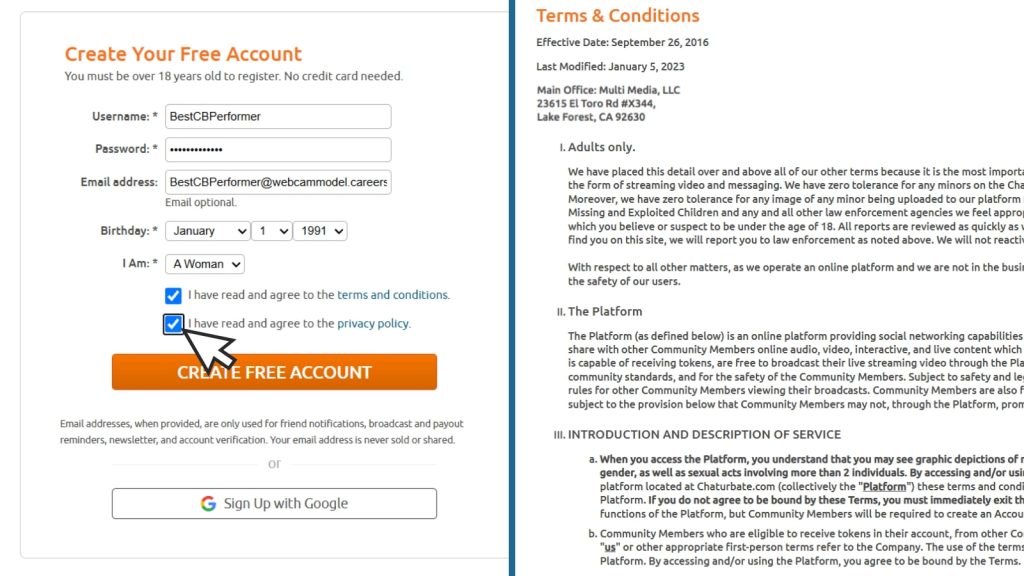
And yes, you should actually read both these things. I totally understand the temptation to just tick the boxes and read all the fine print later. But more often than not, people forget.
The terms and conditions are especially important for new broadcasters. They cover various aspects of the Chaturbate community.
Additionally, in Appendix C of the terms and conditions, you’ll find Chaturbate’s code of conduct. It outlines what’s allowed and what’s not allowed on the platform. To keep Chaturbate a fun, creative, and inclusive adult community, it’s important to know and follow these rules. We want to continue enjoying nice, sexy things around here.
Later, you’ll also need to read and agree to Chaturbate’s independent broadcaster agreement. This covers details about your use of the platform. For instance, all broadcasters are independent contractors. According to the terms and conditions, you’re responsible for reporting taxable income and paying any taxes owed.
Once you’ve read everything and checked both boxes, click “Create Free Account” and celebrate. You’ve taken the first step. Yay, go you!
Step 5: Chaturbate Age Verification
With your account created, make sure you’re logged in. Then click on “Broadcast Yourself.” You’ll see a page titled Independent Broadcaster Verification. Click the orange button that says “Upload New ID.”